Ghost Detector Pro Radar
- 4.6
- Rating
- 5.00M
- Installs
- Free
- Price
 Analysis by App-foxy
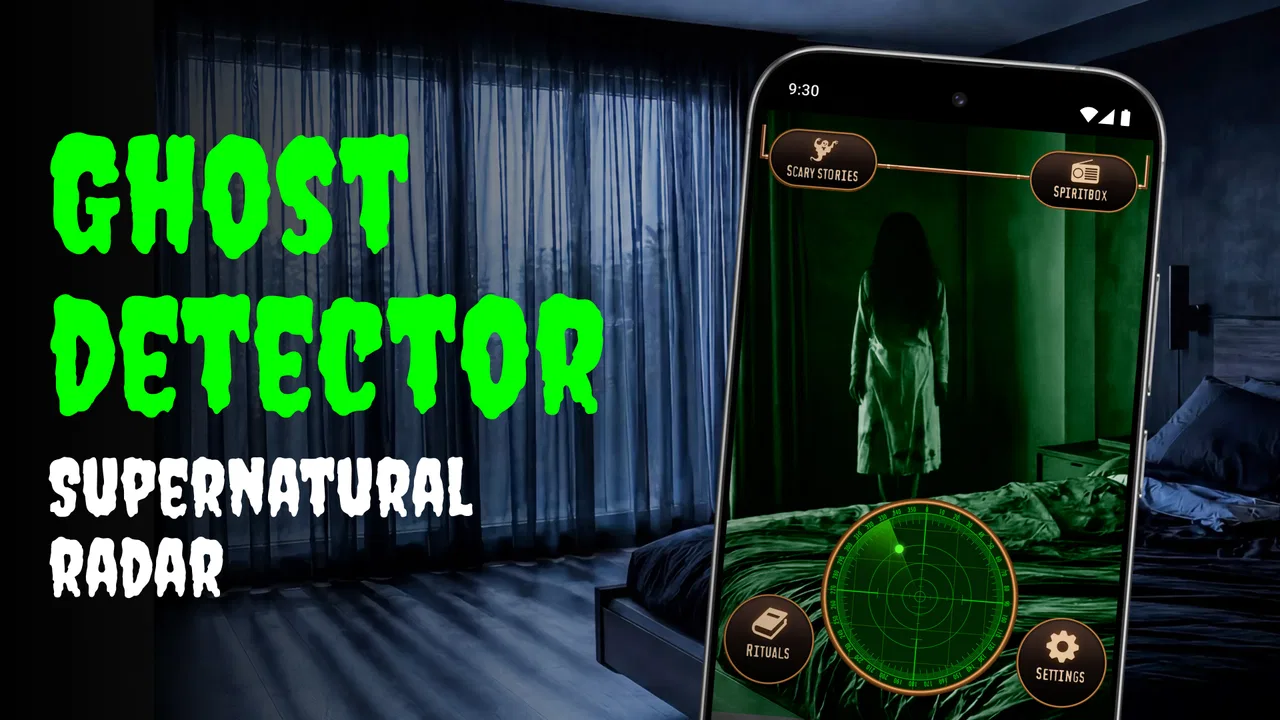
I approached Ghost Detector Pro Radar as a playful entertainment app rather than a scientific instrument, and that distinction shapes the whole experience. Its appeal is easy to understand: open the phone, explore a radar-style interface, and use paranormal-themed tools to create a spooky moment with friends. The app is free to download, aimed at Teen users, and comes from the developer Cards. It has attracted more than five million installs and holds a 4.6 average from roughly thirty-one thousand ratings, which suggests that the concept has found a sizeable audience.
My recommendation depends heavily on what you expect. If you want a lighthearted prop for a sleepover, a Halloween gathering, or a short video, this app gives you an immediately understandable theme without asking you to learn a complicated system. If you are looking for dependable evidence of spirits, measured electromagnetic activity, or a serious paranormal research tool, I would choose something else—or, more honestly, a physical meter and a carefully controlled investigation. The fun here comes from atmosphere and interaction, not from treating a phone screen as proof.
What using the app feels like in practice
The first thing I noticed is how quickly the idea communicates itself. A radar presentation needs very little explanation: you look at the display, move around, and interpret what appears on screen. That makes it suitable for passing the phone around a group. One person can hold it while another asks questions or narrates the scene, and the app becomes a conversation starter instead of a solitary utility.
You May Also Like

 Google Keep - Notes and lists
Google Keep’s Quiet Growth Shows the Appeal of Simpler Notes
As mobile work gets busier, Google Keep keeps winning a simple contest: capture a thought quickly, find it later, and get on with the day.

 Blood Strike: 2.5 Anniversary
Blood Strike’s Loadouts Turn Every Drop Into a Tactical Gamble
A close look at Blood Strike’s custom loadouts: how fast access to signature weapons reshapes its battle royale rhythm, rewards preparation, and narrows the gap between fights.

 Pandora - Music & Podcasts
Pandora’s Music Is Easy to Start, but Harder to Recover
Pandora’s strength is its low-effort path from a seed to a station. Its weak spot is how much confidence it asks you to place in connection, setup, and quiet recovery.

 8 Ball Pool
 Is Built on Rivalries, Rematches, and Routine
A close look at the rivalries, rematches, shared routines, and unanswered safety questions that turn a quick pool match into a persistent mobile community.

 Samsung Music
’s Quiet Strength Is Playing What You Already Own
Its reach comes less from spectacle than from dependable access to a personal library. That simplicity is both the app’s strongest retention engine and its ceiling.

 AccuWeather: Weather Radar
AccuWeather Review: A Quick, Clear Forecast for Everyday Decisions
For everyday plans, the best forecast is the one you can understand quickly. AccuWeather makes rain timing, radar, and local conditions easy to act on, with a few trade-offs.
More From Our News Desk



The broader toolset is also important. The store summary points to radar, EMF, and ghost-box-style functions, so the experience is not limited to one static screen. Switching between paranormal tools gives a casual session some variety. I would not describe that variety as a substitute for a dedicated instrument, but it does help prevent the app from feeling like a single visual trick after the first minute.
In everyday use, the strongest scenario is a social one. Imagine a group of friends exploring an old-looking building during the day, with everyone already aware that the app is for entertainment. One person can scan a room, another can keep track of the conversation, and a third can record the reactions. The app supplies a shared focus. It does not need to establish whether anything supernatural is present to be useful in that setting; it only needs to make the moment more engaging.
That framing also helps with expectations around results. A radar mark, EMF-style reading, or unusual ghost-box output can be entertaining, but I would treat it as a prompt for storytelling rather than a conclusion. Phones contain sensors, radios, and other hardware that can react to ordinary environmental conditions, and a themed interface can make normal changes feel mysterious. The responsible way to use this app is to keep the distinction clear, especially when younger people are involved.
Speed and the first few minutes
For a casual entertainment app, perceived speed matters more than laboratory-style performance figures. I found the concept easy to enter because there is no need to prepare equipment, create a profile, or build a long investigation before trying it. That low commitment is one of its practical strengths: when someone suggests a quick paranormal game, the phone is already the main piece of equipment.
The app’s current version is 1.0.50, and it supports devices running Android 7.1 or later. That broad operating-system reach makes it accessible to people using older phones, although compatibility on paper does not guarantee identical smoothness on every handset. A newer phone may handle animated interfaces and switching between tools more comfortably, while an older model could show more friction during longer sessions or when several other apps are open.
I would begin with a simple check before starting a group activity: close anything unnecessary, make sure the phone has enough charge, and test the selected tool in a quiet minute. This is not because the app requires an elaborate setup, but because a short rehearsal avoids breaking the mood when everyone is waiting. It also lets you decide whether the display is readable in the room’s lighting and whether the audio, if you use a ghost-box-style mode, is appropriate for the setting.
That small preparation is more useful than chasing a perfect “reading.” If the app appears slow, the cause may be the phone, background activity, or the environment rather than the paranormal scenario you are staging. I prefer to identify those ordinary causes first. It keeps the session fun and prevents a technical pause from being mistaken for a supernatural event.
What happens during heavier use
The most demanding moments are likely to come from extended sessions rather than a single quick scan. Moving repeatedly between radar, EMF-themed, and ghost-box-style tools asks more from the device than opening the app and looking at one screen. Keeping the display active can also affect battery life over time, particularly on an older phone or a device that already struggles to hold a charge.
I would therefore use it in short rounds. Give each person a turn, agree on a location, note what happened, and then pause before changing tools. This workflow has two advantages: it reduces the chance of a phone becoming warm or sluggish during a long uninterrupted session, and it makes the group pay attention to context instead of reacting to every screen change. A short log of the room, time, and observed result can be surprisingly helpful when you later compare what happened.
There is also a social form of “heavy use” that has nothing to do with processor load. In a crowded room, several people may touch the phone, talk over the audio, or move it rapidly from one place to another. That can make the output difficult to interpret and can lead to accidental taps. I get better results as a piece of entertainment when one person operates the phone while everyone else watches and comments. Passing it around between rounds works better than passing it constantly during a scan.
For recording content, I would keep the session simple. Use one tool at a time, avoid making dramatic claims, and explain to viewers that the application is a paranormal-themed entertainment experience. That approach produces a more credible and enjoyable clip than presenting every visual change as evidence. It also protects the app’s best quality—the playful atmosphere—from being undermined by exaggerated conclusions.
Stability, interruptions, and recovery
Stability is especially noticeable in an app used for atmosphere. A brief interruption may be harmless when browsing, but it can spoil a carefully built spooky moment when everyone is listening. My practical advice is to start a fresh session before an event, keep the phone reasonably clear of background tasks, and avoid relying on the app as the only entertainment. If it pauses or closes, the group should still have a story, a conversation, or another activity ready.
Recovery is straightforward in principle: return to the app, select the tool again, and continue from the room or scene you were exploring. I would not build a long investigation around an uninterrupted run, because a free mobile entertainment app is better suited to flexible play than to formal evidence collection. Treating each round as self-contained means a restart becomes a minor inconvenience rather than the end of the evening.
Notifications are another practical distraction. Before using the app in a dark room, I would enable a suitable focus or do-not-disturb mode, while still considering whether anyone needs to reach you. A sudden message can break the mood, and a bright notification can make people jump for a reason that has nothing to do with the app. This is a small preparation step, but it makes the experience feel much more deliberate.
I also recommend keeping the volume moderate. Ghost-box-style audio can be startling, and loud playback is not necessary for a group to enjoy the idea. In a shared home or public place, headphones may be more considerate, although that changes the social side of the experience because fewer people can react together. The right choice depends on whether you want a group performance or a more private experiment in atmosphere.
Older phones, battery, and practical limits
The minimum Android requirement of 7.1 is useful for people with older devices, but I would still separate operating-system compatibility from overall comfort. A phone can install an app and remain less pleasant to use if its battery is worn, storage is nearly full, or its screen is difficult to read. Those limitations are not unique to this title, yet they matter more when the app is expected to keep a display active while a group waits for a response.
If you plan to use it outdoors, remember that bright sunlight can make a dark radar-style interface harder to see. At night, the opposite problem appears: excessive brightness can ruin the mood and strain the eyes. Adjusting brightness before beginning is a simple way to improve the session. I would also avoid placing too much importance on a result obtained while the phone is being shaken, covered, or handled by several people at once.
Storage is less of a concern for a short entertainment tool than it is for a large game, but general device health still affects perceived responsiveness. Keeping the phone updated within its supported environment, restarting it before a planned event, and leaving room for normal background operation are sensible habits. None of these steps turns the app into professional equipment; they simply remove avoidable sources of frustration.
There is a safety and judgment limit as well. I would not use a paranormal-themed app to encourage someone to enter unsafe buildings, approach strangers, disturb private property, or remain in a frightening situation against their wishes. The Teen rating is a useful reminder that the tone may not suit every child, and adults should consider the people involved before presenting the experience as real. The app works best when everyone understands that the goal is entertainment.
How it compares with ordinary alternatives
Compared with watching a paranormal video, this app is more interactive. You decide where to point the phone, when to switch tools, and how to involve the people around you. That participation is its clearest advantage. A video supplies a finished story, while the app gives a group a prop for creating its own story.
Compared with a standard compass or a genuine EMF meter, however, it should not be treated as an equivalent. A dedicated meter is designed for measurement and normally gives you a clearer idea of what physical quantity it is detecting. A compass has a specific navigational purpose. The paranormal tools here are packaged for an entertainment context, so their value is experiential rather than scientific. Choosing this app over a physical device makes sense when convenience and playfulness matter more than controlled measurement.
It also differs from a simple horror game. A conventional game usually has defined objectives, progression, and rules. This app leaves more of the session to the users. That can feel liberating in a group, but it may feel thin if you want a structured challenge or a story that tells you what to do next. Someone seeking puzzles, levels, or a clear ending would probably be happier with a dedicated horror game.
The free entry point makes it easy to try without committing money at the start, but in-app purchases range from ninety-nine cents to ninety-nine dollars and ninety-nine cents per item. I would be cautious here, especially if a child is using the phone or if the app is being passed around at a party. Keep purchase controls in place and decide in advance whether the free experience is enough for your needs. For me, the app’s value should be judged by the fun it creates without assuming that spending more will make the readings more trustworthy.
Who will enjoy it, and who should skip it
I think it suits friends who enjoy spooky themes but do not want to prepare equipment. It is also a reasonable choice for a themed gathering, a Halloween activity, a short social-media segment, or a teenager who likes experimenting with paranormal aesthetics under sensible supervision. The low barrier to entry is important: the app can turn an ordinary walk around a familiar home into a small performance.
It is less suitable for anyone who is anxious about supernatural claims, easily frightened by suggestive audio, or likely to interpret an entertaining output as proof. I would also skip it if your main goal is scientific investigation. The app may imitate the language and appearance of paranormal tools, but that does not make it a validated measuring system. A serious investigator should use controlled conditions, document ordinary explanations, and select equipment built for the physical measurement in question.
People with very old or heavily burdened phones should try it before planning a major event around it. The Android 7.1 minimum keeps the door open to older hardware, yet a supported device may still offer a less comfortable experience than a recent one. If your phone regularly slows down when keeping an app open, use short rounds and avoid presenting the session as a continuous investigation.
Finally, I would not recommend paying for anything simply because a dramatic result appears on screen. The best reason to use this app is that it gives friends something to do together. If the group is already entertained by the free tools, that may be all you need. If the group wants deeper structure, reliable measurement, or a polished narrative, another category of app will be a better fit.
My final view after weighing the experience
Cards has positioned this as an accessible entertainment app, and that is where I think it performs most naturally. The combination of radar, EMF-themed interaction, and ghost-box-style atmosphere gives a phone-based activity more personality than a static novelty screen. Its free price and large install base make it easy to understand why people try it, while the 4.6 average from around thirty-one thousand ratings shows that many users respond positively to the concept.
My performance verdict is deliberately practical: expect a quick-to-start experience, but do not confuse easy access with professional reliability. On a healthy compatible phone, it should be approached in short, flexible sessions. During heavier use, manage battery, brightness, notifications, and background activity. If something interrupts the app, restart the round rather than treating the lost moment as a serious failure. Those habits make the experience smoother without pretending that the application offers scientific certainty.
The app’s most valuable feature is not any individual reading. It is the way the tools give a group a shared ritual: scan, listen, react, question, and move on. That can be genuinely fun when everyone understands the boundaries. I would recommend it to friends who want a portable paranormal prop, provided they keep the tone playful and use common sense about locations, volume, privacy, and purchases.
My bottom line is simple: use Ghost Detector Pro Radar for atmosphere and group entertainment, not for proof. If that is the experience you want, the app is an easy free starting point with enough themed variety to support several short sessions. If you need dependable measurements, a structured horror game, or a guaranteed smooth experience on an aging phone, choose a purpose-built alternative instead.
FAQs for Ghost Detector Pro Radar
01What is Ghost Detector Pro Radar and how does it work?
Ghost Detector Pro Radar is an entertainment app designed to simulate paranormal detection using a radar-style interface, visual effects, sounds, and on-screen readings. It may appear to scan your surroundings for unusual activity, but these results should not be treated as scientific evidence. The app is best understood as a playful tool for storytelling, pranks, or creating a spooky atmosphere with friends.
02Does Ghost Detector Pro Radar really detect ghosts or paranormal activity?
No, Ghost Detector Pro Radar cannot reliably prove the presence of ghosts or other supernatural entities. The readings and signals shown by the app are generated for entertainment and may be influenced by programmed effects, random results, or the device’s available sensors. Users should avoid interpreting the displayed information as a genuine paranormal investigation or as a replacement for professional advice.
03Does the app require special equipment, internet access, or location permissions?
The app is generally designed to run on a standard Android or iOS device without dedicated paranormal equipment. Depending on the version and platform, it may request access to features such as sensors, sound, vibration, camera, or location services. Review the permission prompts carefully before accepting them, and remember that some features may work differently or be limited when the device is offline.
04Is Ghost Detector Pro Radar safe for children and suitable for use at night?
Ghost Detector Pro Radar is usually harmless as a novelty app, but its scary sounds, flashing visuals, and unexpected readings may frighten young children or sensitive users. Parents should check the app’s content and permissions before allowing children to use it. It is also wise to avoid using it near roads, stairs, water, or other hazardous areas where distractions could cause an accident.
05Is Ghost Detector Pro Radar free to download, and does it include ads or in-app purchases?
The availability, price, advertising, and in-app purchase options can vary according to the device, country, and app-store version. Before downloading, check the official Google Play or Apple App Store listing for current pricing and subscription details. Also review the requested permissions and developer information, since third-party versions or similarly named apps may offer different features, advertising policies, or privacy terms.
Pros
- Simple radar-style interface that is easy to understand at a glance.
- Includes visual and sound effects that make sessions feel more immersive.
- Quick to launch and use without lengthy setup or account registration.
- Offers a playful tool for paranormal-themed entertainment with friends.
- Runs well for casual use on many older Android devices.
Cons
- Readings are entertainment only and are not supported by scientific evidence.
- Frequent alerts may feel random and reduce the sense of credibility.
- Some features or content may require in-app purchases or ads.
- The radar display can be misleading for users expecting real detection.
- Background use of sound and sensors may affect battery life over time.

Ghost Detector Pro Radar
Gallery